

In 2023, Samsung engineers pasted production source code into ChatGPT to debug a logic error. Three times. In three separate sessions. No company filter, no approval gate, no way to reverse it. The code never came back out. But once it’s in an LLM, “out” becomes optional. Competitors, researchers, future model training pipelines, the LLM vendor’s own monitoring systems (any of these could have access to it downstream). Samsung didn’t know for six months. By then, the damage surface was unmappable.
This is why traditional DLP fails on LLMs. Your email DLP watches for credit card numbers in outbound messages. Your database DLP logs access to sensitive tables. But the moment an engineer pastes a API key, a customer PII record, or source code into ChatGPT, your DLP sees nothing. The prompt goes over HTTPS to OpenAI’s infrastructure. Your tools have no visibility into it. And the data sits in a system you don’t control, in a model training regime you can’t audit, indefinitely.
LLM DLP is not traditional DLP with a ChatGPT plugin. It’s a category built from the ground up around the specific threat: data flowing into LLMs and getting lost to your organization permanently. This guide is for CISOs trying to field an LLM DLP program without either over-blocking productivity or pretending the risk doesn’t exist.
Why traditional DLP misses LLM data leakage
Traditional DLP is built on a simple model: data has a perimeter, and we inspect data at the edges of that perimeter. Email leaves the organization, so we inspect it. Files upload to cloud storage, so we inspect them. A user connects to an external repository, so we watch the connection.
LLMs shatter this model in four ways.
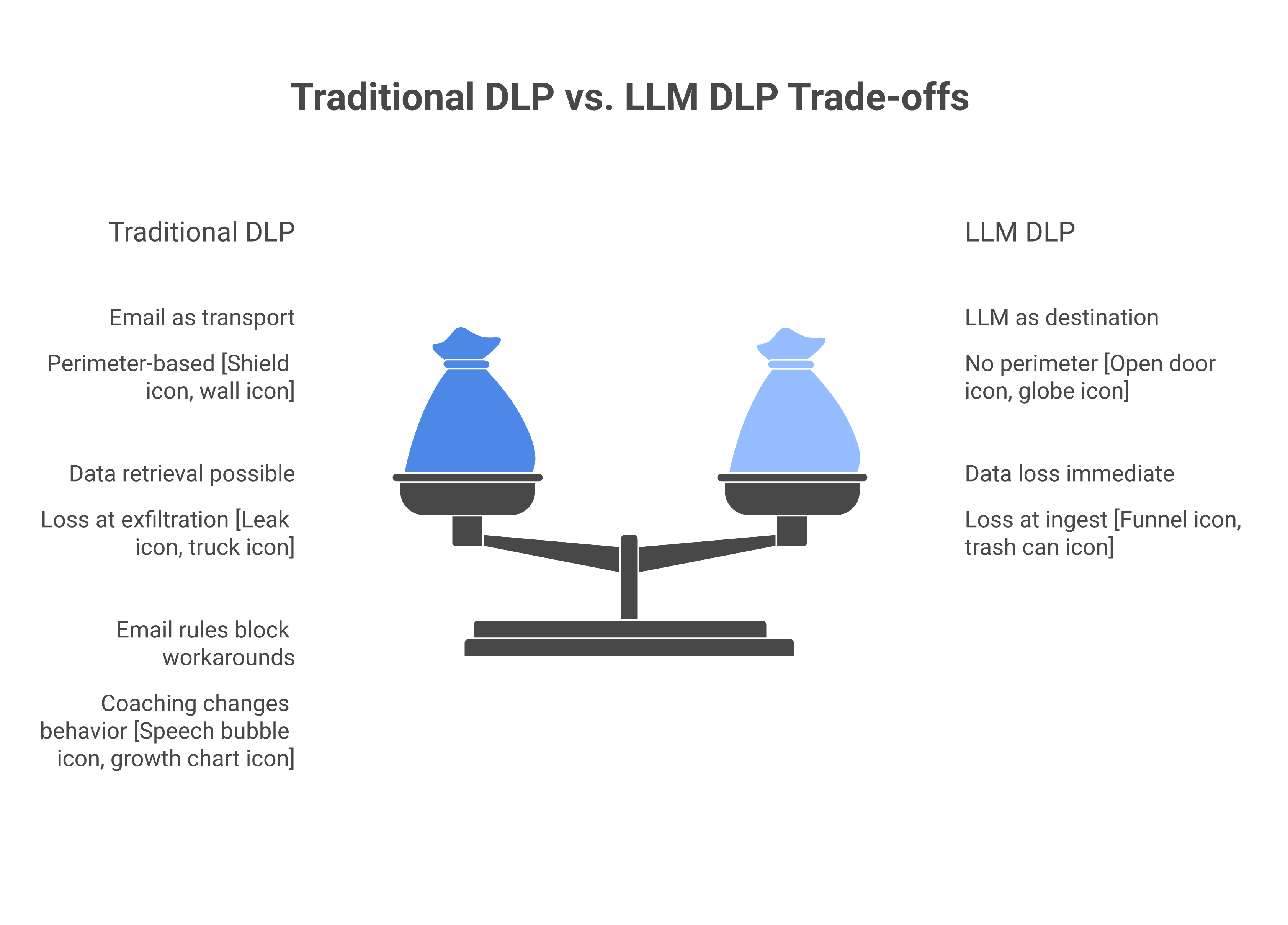
First, they’re not checkpoints, they’re destinations. When you email a file, email is a transport. The data lives somewhere before the email and somewhere after. DLP inspects the movement. But when you paste data into ChatGPT, you’re not transiting data. You’re shipping it to a destination outside your control. Traditional DLP sees “outbound HTTPS to OpenAI” and stops. A hundred companies talk to OpenAI every day; one more HTTPS connection is noise. It doesn’t see the sensitive payload inside the prompt.
Second, once data enters an LLM, retrieval becomes impractical. If you discover a secret in an email thread, you can recall the email, delete it, notify recipients. With LLMs, once the data is in the system, “delete” doesn’t exist. You can’t ask OpenAI to scrub your API key from GPT-4’s training data. You don’t even know which other users’ prompts might now include your secret because the model saw it in training or in a previous conversation. The asymmetry is total.
Third, the loss happens at ingest, not exfiltration. A traditional DLP block says “don’t let this data leave the company.” LLM data loss is different. The moment the data arrives in the model’s context, it’s lost from your perspective. Whether it exfiltrates downstream is almost secondary. The loss already happened. This inverts the control model: you’re not blocking outbound traffic, you’re blocking inbound prompts that contain data.
Fourth, users bypass email rules but can’t bypass their own habits. A user who wants to send a file to a personal email can find ways around email DLP. But a user who reflexively pastes code into ChatGPT to debug it isn’t trying to exfiltrate. They’re solving a problem. They don’t think of ChatGPT as a data destination. That’s the blind spot DLP has to close.
So traditional DLP doesn’t work on LLMs because the threat, the perimeter, and the recovery model are all different.
The four ways data leaks into LLMs
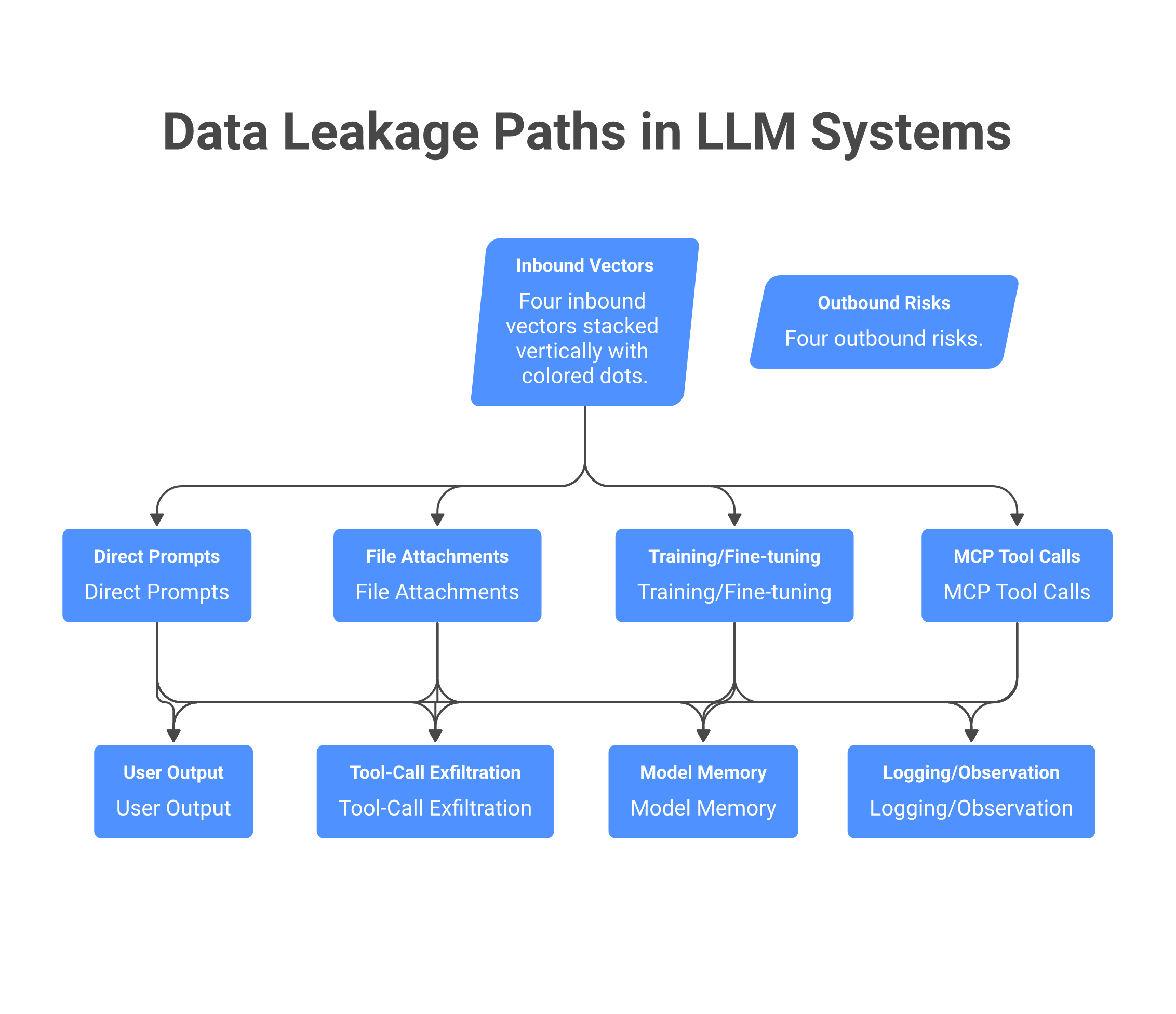
An LLM DLP program needs to cover four inbound vectors. If you miss one, you’re theater.
Vector 1: Direct user prompts. A user opens ChatGPT (or Claude, or Gemini) in a browser and pastes something sensitive: source code, a customer list, a contract, a medical record, documentation from a confidential project. The user types the query directly. This is the fastest vector and the hardest to stop without knowing what users are trying to do. The moment they hit enter, the data leaves your perimeter and arrives in the LLM provider’s infrastructure. The only effective control is both cultural and technical: make prompting into a “borderless” workspace within the organization where sensitive data doesn’t live. You can’t DLP your way out of user intent, but you can train people to recognize when they’re about to make a mistake.
Vector 2: File and context attachments. Your application uses an LLM API (OpenAI, Anthropic, Google) to power a feature. The application sends user data to the API in the prompt context, either directly or via files. Examples: embeddings from internal documents fed into a search function, customer support tickets analyzed by a summarization tool, medical histories processed for pattern detection. This is intended use, but it’s still data shipped to an external LLM. A browser extension might also silently ship page content to an LLM without the user knowing. An LLM DLP program has to know what prompts are being sent by which applications, what files are being attached, and how to classify them before they leave your network.
Vector 3: Model training and fine-tuning opt-in. You use an LLM’s API with feedback mechanisms enabled. The model vendor trains on your prompt-response pairs to fine-tune the model or improve safety. Some LLM providers offer this as an “optional” feature but quietly enable it by default. Your data flows into the model’s training pipeline, permanently. This is the least obvious vector and often the hardest to audit. Vendors may claim “you can opt out” but the opt-out button is buried, or the default retention policy doesn’t mention training. An LLM DLP program needs contractual controls here, not just technical ones. See EU AI Act implications for data residency and training restrictions.
Vector 4: MCP tool calls that fetch and expose data. You deploy an agentic system that reads internal documents, emails, databases, or files and processes them. The agent receives a goal, calls MCP (Model Context Protocol) tools to fetch data, and includes that data in its prompt to the LLM. This is invisible to traditional DLP, the data never left your network for the first step, yet the agent shipped it into an LLM context as enrichment. A user asks the agent to analyze a folder of files, and the agent fetches all of them and passes their content to the model for synthesis. See Pillar 2 for governance of agents, but the short version: agent-to-LLM data flows via tool outputs have to be classified and controlled. MCP servers that expose sensitive APIs (customer databases, code repositories, credential stores) become inbound vectors the moment they’re callable by an agent.
An LLM DLP that covers only direct user prompts (vector 1) is a compliance checkbox, not a program. You need visibility into at least vectors 1 and 2. Vectors 3 and 4 become necessary if you’re running agentic systems, fine-tuning workflows, or MCP-connected infrastructure.
The four ways data leaks out of LLMs
Assuming data makes it into an LLM, what’s the exfiltration risk? This isn’t theoretical. It’s the reason the risk remains material even after data has been ingested, and why some data losses can’t be undone.
Vector 1: Direct output to the user session. The model generates a response that quotes your internal data. A user asks an LLM for help understanding an internal process and the model, having seen similar patterns during training, generates a response that includes verbatim content from your company’s documentation. The user copies the output and pastes it in a Slack thread with external people. The leak is through the user, but the LLM was the amplifier. Detection here: monitor what users copy from LLM response windows, flag outputs that contain flagged keywords, log the copy-paste action. Prevention: redact sensitive patterns from the response before the user sees it.
Vector 2: Tool-call actions that write to third-party systems. An agent calls a tool to write data somewhere. The agent summarizes a sensitive customer record and writes the summary to an external SaaS system (a CRM, a collaboration tool, a data warehouse) that the organization uses. Or it pipes internal secrets to a logging service. The data exits through the agent’s actions, not the model’s words. This happens because the agent misunderstood the goal, or was compromised by a prompt injection attack that redirected it to exfiltrate. Detection: log every tool call the agent makes, classify which ones write to external systems, flag unapproved exfiltration. Prevention: restrict which external destinations an agent can write to, require approval gates for any write to non-internal systems.
Vector 3: Model memorization and future response regurgitation. If your proprietary data was in the training set, subsequent fine-tuning adjustments to that model could be influenced by your data. More directly: if you send the same sensitive prompt to the same model twice (or a user does), the model may internally “remember” it and regurgitate it in subsequent conversations with other users. This is low-probability but high-impact. The data you sent to GPT-4 in March could reappear in a response to a different user in September. You have no technical way to know. Treat this as a low-probability, high-impact exfiltration vector. Mitigation: rotate models you use for sensitive workloads, use “data not retained” modes where available, avoid fine-tuning on sensitive data.
Vector 4: Observability and logging sprawl. This is the clearest operational one. OpenAI retains conversation logs for 30 days by default unless you opt into a stricter retention policy. ChatGPT Enterprise offers a “data not retained” mode. During standard retention windows, someone with access to OpenAI’s systems, a vendor employee, a government agency with a warrant, a researcher with data-share agreements, can read your prompts. This is not a breach. It’s the standard model. And it’s why ChatGPT is not enterprise-safe without contractual restrictions. Additionally, many LLM vendors log prompts for abuse detection, safety monitoring, and research. Some third parties have access to aggregate data (e.g., “what fraction of prompts mention healthcare?”). If your prompt includes identifying details about a customer or strategy, it could become part of a vendor’s dataset. Most terms of service disclaim liability for this. Mitigation: contractual controls only, “data not retained” modes, “no training” clauses, audit rights to vendor logging, or keeping sensitive workloads on private models you control.
An enterprise LLM DLP program can’t prevent exfiltration vectors 2–4 entirely through technical controls. You need contractual controls (vendor terms), architectural controls (where you run the model), and governance controls (what data you allow near LLMs at all). But vectors 1 and 3 (visible in user outputs and internal memory) are both preventable or detectable with the right monitoring and response infrastructure.
Real incidents: what actually happened
Theory is useful only if it maps to reality. Here are three incidents that shaped how the industry thinks about LLM DLP.
Samsung 2023, source code leak. Samsung engineers pasted production code into ChatGPT three times to debug a logic error. No approval gate, no company filter, no way to retrieve it. The code included internal APIs, database schemas, and credential references. Samsung didn’t discover the leak for six months. OpenAI confirmed they retain conversation logs for 30 days by default; Samsung’s code may have been in training data or aggregate analysis after that. Outcome: Samsung banned public LLMs for any internal use and shifted to private models. Cost: estimated $5M+ in incident response, audits, and remediation.
New York Times v OpenAI, discovery implications. NYT’s 2024 lawsuit alleged that OpenAI trained models on copyrighted content without permission. During discovery, it became clear that every prompt sent to ChatGPT is logged and retained by OpenAI. The lawsuit hasn’t resolved, but the principle stuck: if you send data to a model vendor, assume it’s in a log somewhere, auditable by attorneys, and retained beyond your control. This shaped the legal calculus for any organization handling IP, trade secrets, or regulated data.
Gartner’s loss quantification. Gartner’s 2025 AI risk report estimated that organizations lose between 3-7% of sensitive data annually to LLM leakage (in enterprises using public models without DLP). For a company with $100M in sensitive IP or customer data, that’s $3-7M in annual loss exposure. Most organizations don’t quantify or report this, so the true figure is likely higher. The report noted that enterprises with LLM DLP programs in place reduced loss to under 1% annually.
These incidents show the risk is material, specific, and measurable. The recovery is not. Build controls accordingly.
Evaluating LLM DLP tools: eight questions to ask
There are vendors now claiming “LLM DLP” functionality: Lasso Security, Harmonic, Nightfall AI, Netskope AI, Prompt Security, Polymer, DoControl, Microsoft Purview for AI, and Zscaler AI Guard. Most are repositioning existing DLP capabilities or bolting AI monitoring onto web security platforms. Before you buy, ask these eight questions and require specific technical answers.
1. Is this inline or passive? Inline tools sit in the data path and can block or redact before data reaches the LLM. Passive tools log after the fact. Inline is stronger for prevention but carries latency risk. Passive is easier to deploy but only gives you audit trails. What’s your threat model: stopping the leak, or detecting it after?
2. How does the tool intercept prompts? Browser extension? Network proxy? API-level integration? Application-side instrumentation? Each has different coverage. Extensions miss API calls and agents. Proxies miss native APIs. API-level integrations miss your internal agents. Ask specifically: “Show me what you’ll miss in my environment.”
3. How are policies defined? Regex patterns (fast, brittle)? ML classifiers (more flexible, slower)? Embedding similarity (best for semantic matching, computationally expensive)? A good tool should let you mix approaches: “Block anything matching this regex, redact anything scoring high on this classifier.” If the tool forces you into one mechanism, it’s immature.
4. Does it cover agent tool-calls? Your agents call tools to fetch data and pass it to the LLM. Does the tool inspect the full context the agent builds? Or does it only see the final prompt? If an agent fetches your customer database via an MCP server and includes it in a prompt, a tool that only watches the final prompt will catch it. A tool that only watches API calls to ChatGPT will miss the data flowing through the agent’s context entirely.
5. Can it block indirect prompt injection via tool outputs? An agent fetches a document that contains attacker-controlled content (an email body, a web page, a database record). That content becomes part of the prompt and tries to redirect the agent. Does the tool understand that tool outputs are part of the attack surface? Or does it only look at direct user inputs?
6. What’s the false-positive tax? If the tool blocks or redacts legitimate prompts (a developer asking about their own code, a researcher discussing public datasets), your teams will disable it or bypass it. Ask for concrete metrics: “What’s your false-positive rate on the top 1,000 LLM vendors?” And pilot it on your real workloads, not the vendor’s demo.
7. How are blocking decisions auditable? If the tool blocks a prompt, can you see why? Can a user appeal the block? Can your CISO pull a report of all blocks in the last 90 days, grouped by reason? If the tool is a black box, you can’t trust it.
8. Does it integrate with your existing DLP and SIEM? Can you export decisions to your SIEM? Can it ingest policies from your existing DLP tool? If it’s a standalone island, you’re maintaining two policy engines. If it’s part of your security stack, it scales.
Most LLM DLP products in 2026 do three of these well and five poorly. Test on your actual use cases (not a vendor demo) before committing budget. If a vendor can’t answer these eight questions specifically, move on.
A minimum-viable LLM DLP program in 90 days
You don’t need a six-figure tool to start. Here’s what you can ship in the first 90 days without a vendor.
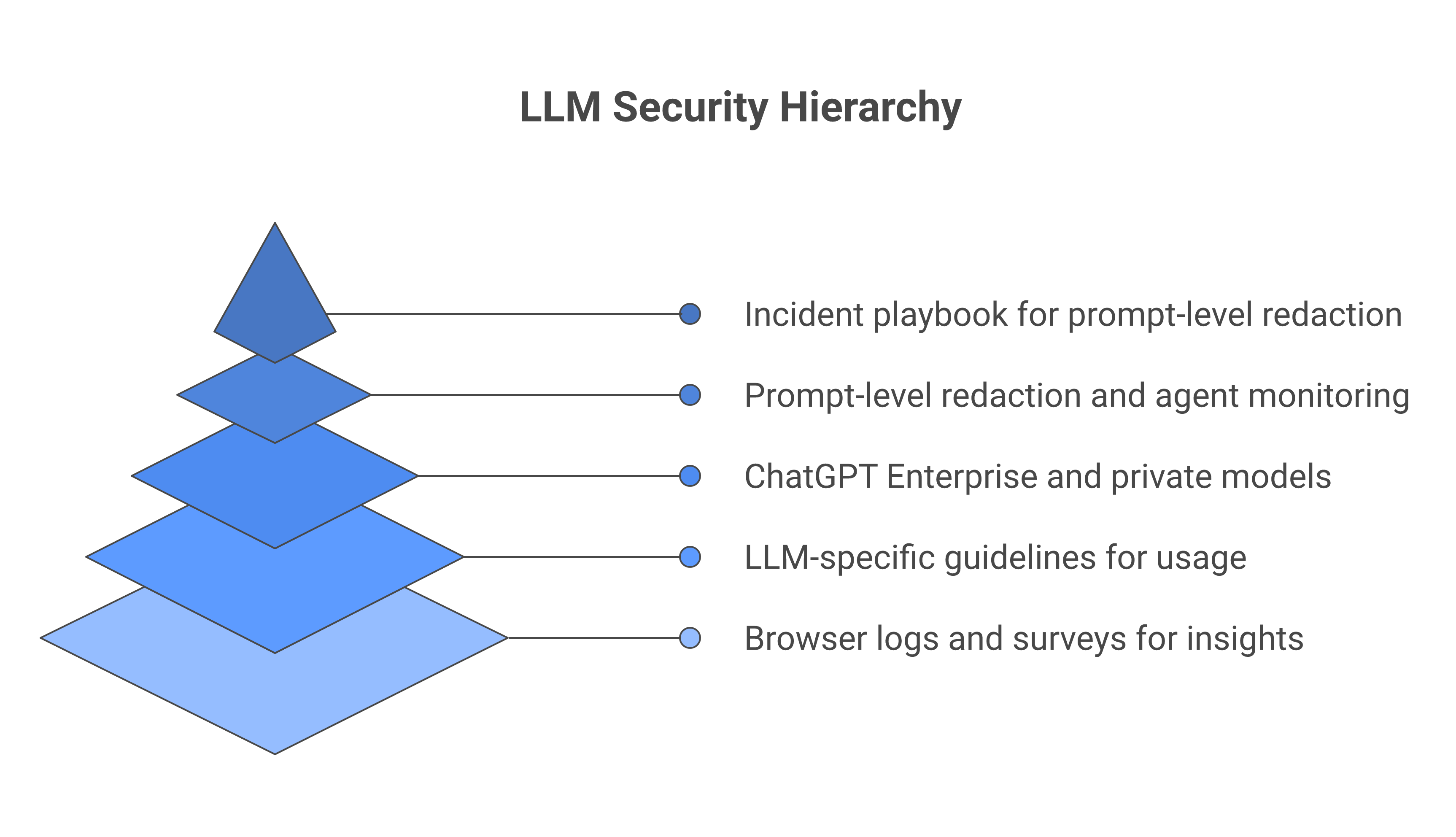
Control 1: Sanctioned-tool allowlist. Document which LLM vendors your organization approves for work. Examples: ChatGPT Enterprise (approved, “data not retained” mode required), Claude via Anthropic Enterprise (approved, no training on prompts), Claude.ai in public form (not approved for sensitive work), local LLMs on company infrastructure (approved, full control). Use your endpoint management tool to enforce a browser policy that warns on unapproved destinations, logs access, or blocks it entirely (depending on your risk tolerance). This is your first control: visibility plus choice architecture.
Control 2: Browser extension for prompt visibility. Install a lightweight extension (or integrate with your DLP vendor’s extension, if you have one) that watches for large text copy-paste events. The moment a user copies a large block of text and navigates to an LLM site, you log it. You don’t inspect the content yet, just flag the event. After 30 days of logging, analyze patterns: which teams are copying what, how often, to which LLM services. You now have data to build policy on.
Control 3: Prompt-level redaction for known-sensitive fields. Identify your highest-risk data types: API keys, database credentials, customer account numbers, patient IDs, source code from specific repos. Build simple regex or classifier rules to detect these patterns in prompts before they hit the LLM. When detected, redact the sensitive part (replace with [REDACTED_CREDENTIAL] or similar) and log the event. This happens at the application level (if LLM calls go through your app) or at the browser extension level (if users interact directly with ChatGPT). You don’t need to block. Redaction lets the user still use the tool, but the sensitive data stays behind.
Control 4: Audit output monitoring on agent actions that write to external systems. If you’re running agents, log every tool call that writes data to a third-party SaaS system (Salesforce, Slack, external data lakes, etc.). Build a simple rule: “Agent actions writing to external systems require approval” or “Agent writes to external systems are logged and reviewed daily.” This catches exfiltration via agent tool-calls (vector 2 from earlier). You’re not blocking the agent. You’re making sure you can see and audit what it does.
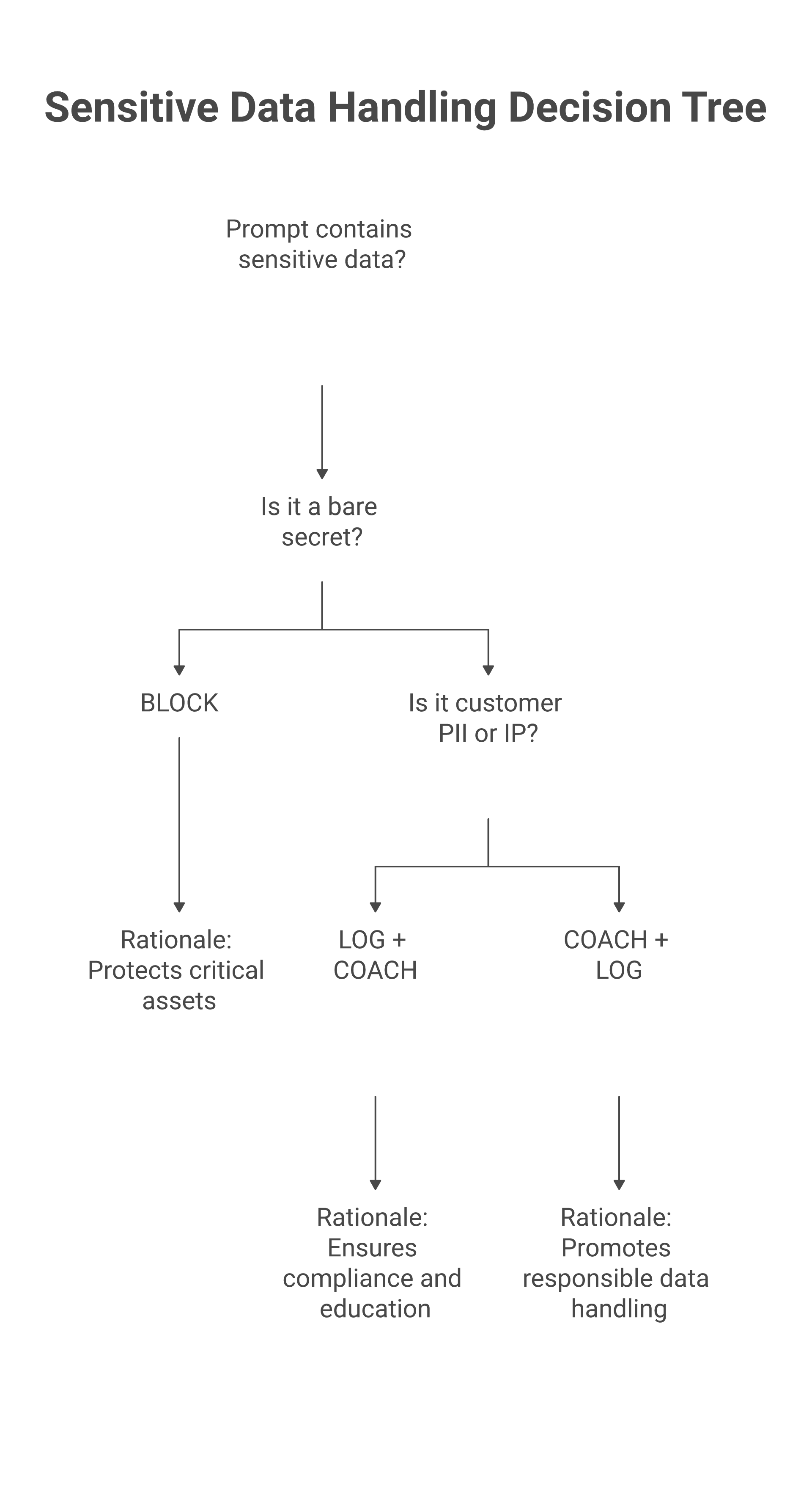
Control 5: User coaching over blocking. When your system detects a risky prompt (high indicator of sensitive data), don’t block it. Instead, show the user a message: “This prompt looks like it contains [credential type]. Sending it to ChatGPT means it may be logged by OpenAI and trained on. Consider: (a) redacting the sensitive part, (b) using ChatGPT Enterprise instead, (c) trying a local model.” Give the user a choice. Block only the highest-risk patterns (bare credentials, strings that match your data classification rules exactly). Everything else is coaching plus logging.
You can build this entire program with tools you already have: endpoint management (Jamf, Intune), a simple extension (can be custom), and a log aggregation tool (Splunk, Datadog). No vendor tool required. This is defensible ground. After 90 days, you’ll have data on where your real gaps are, and you can shop for tools that address them specifically.
The honest tradeoff
LLM DLP is not a solved problem. You cannot prevent all data loss to LLMs without also preventing all use of LLMs. Every control has a productivity cost. Every control has a compliance or privacy implication (Do you log all prompts? Who can see that log? For how long?).
The move is not “solve LLM data loss completely.” It’s “reduce the frequency and severity of high-risk data loss with tools and process, accept the residual risk, and design incident response for when it happens anyway.”
An enterprise that says “our people don’t paste secrets into ChatGPT because we have DLP controls” is probably overselling. An enterprise that says “we’ve classified where sensitive data flows, we’ve designed controls to reduce volume, we’ve trained people, we’ve got a playbook if it happens, and we’re auditing the program quarterly” is on defensible ground.
Frequently asked questions
Does ChatGPT Enterprise solve the LLM DLP problem?
Partially. ChatGPT Enterprise offers “data not retained” mode (prompts not kept for training or monitoring after 30 days) and better contractual terms than the consumer product. This addresses exfiltration vector 4 (vendor logging). But it doesn’t prevent the ingest risk (the data is still in the model during processing and could be regurgitated) and it doesn’t cover the broader ecosystem (your teams use Claude, Gemini, and other models too). A few teams on ChatGPT Enterprise is not a DLP program. Think of it as one control in Layer 3 of the minimum-viable program above, not a complete solution. If you deploy it, still build controls 1, 2, 4, and 5.
Does Claude Enterprise or private model deployments solve this?
Claude Enterprise (from Anthropic) offers similar “data not retained” commitments and zero training on your prompts. Some organizations choose to run Claude in a private deployment (hosted by Anthropic but isolated to your organization). Both are better than public ChatGPT for sensitive workloads, but neither prevents data leakage via agent tool-calls or RAG systems. You still need controls on which data can flow into the prompt context, and you still need to log what agents do. The model choice is one control, not the whole program.
Can we rely on Microsoft Purview for LLM DLP?
Purview is moving into LLM monitoring via Copilot integrations and M365 app instrumentation, but as of 2026 the feature set is narrow. It catches Copilot-specific use (Word, Excel, Teams) and integrates with your existing Purview DLP policies. It does not catch: - Direct access to ChatGPT, Claude, Gemini - Agent-to-LLM data flows outside M365 - Third-party SaaS apps that use LLMs internally - Browser-based access to public LLM services
If your organization is entirely Copilot and M365, Purview is a solid start. If you use a broader set of LLM services, Purview is part of the stack, not the whole stack.
What’s the right balance between blocking and coaching?
A working rule: block only the highest-risk data (bare secrets: API keys, database passwords, private keys). For everything else (customer lists, source code snippets, strategic docs, IP), log and coach. If you block too much, users work around you or shadow-IT escalates. If you log too much, you drown in noise and create privacy concerns. Start with blocking secrets, logging medium-risk content, and coaching on borderline cases. Tune based on incident data and false-positive feedback.
How do we measure LLM DLP effectiveness?
Track four metrics monthly: 1. Coverage: % of employees you have visibility into (via browser logs, tool instrumentation, or survey). Aim for 90%+ in 6 months. 2. Blocked/redacted incidents: Count of sensitive prompts your tools prevented or redacted. This should trend up as you add controls, then stabilize. 3. Confirmed data losses: Count of actual data losses to LLMs that you’ve confirmed (via incident report, employee report, or vendor notification). This should trend down as controls mature. 4. Unmanaged LLM use: Count of employees using LLM services outside your approved vendor list. This should trend down as approved pathways become easier to use than shadow alternatives.
These four metrics form your scorecard. Post them on a dashboard. Share quarterly with the security team and leadership. LLM DLP is not a one-time project; it’s a program you measure and tune continuously.
How do we handle the privacy implications of logging all LLM use?
Logging LLM prompts means storing (for 90+ days) what employees ask AI systems to do. This is sensitive from a privacy perspective. Here’s how mature programs handle it: - Minimize what you log. Don’t log the full prompt unless necessary. Log metadata: timestamp, user, LLM service, content classification (e.g., “high-risk credential detected”). Log the full prompt only if a flag triggers. - Limit who can see logs. Restrict access to CISO, security ops, and legal (for incident response). Not the employee’s manager. Not HR. - Publish a transparency policy. Tell employees: “We log prompts sent to external LLMs to prevent data loss. We’ll review the log only if an incident is suspected or a compliance audit requires it. Access is restricted to security staff.” - Set a retention window. Keep logs for 90 days for investigation, then delete. Don’t keep them forever. - Encrypt logs at rest and in transit. Same standard you apply to any sensitive data.
If you can’t justify this to your privacy team and employees, you don’t have a program. You have a liability.
LLM DLP vendor landscape (vendor-agnostic summary)
If you do choose to buy a tool, here’s what’s on the market in 2026. None of these endorsements, just a map. Most vendors are strong in one or two categories and weak in others.
Lasso Security, purpose-built for LLM DLP. Strongest at inline prompt redaction and pattern-matching classification. Uses browser extension + API hooking. Policy definition is regex-heavy; ML classifiers coming. Good at blocking secrets, weaker at semantic data loss (detecting that a prompt contains your competitive strategy, not just keywords). Integrates with SIEM.
Harmonic, started as a security platform, added LLM monitoring. Inline and passive options. Good at vendor-agnostic coverage (works with ChatGPT, Claude, Gemini, custom APIs). ML classifiers baked in. Weaker at agent-level visibility and MCP tool inspection. Good at output monitoring (detecting what the LLM generates). Cloud-only.
Nightfall AI, patterns and classification focus. Strong at finding sensitive data in unstructured text (API keys, PII, secrets). Limited to prompt logging and detection; can’t do inline redaction. Passive tool, good for audit trails and reporting, not for prevention. Integrates with your DLP.
Netskope AI, web security vendor adding LLM monitoring to their platform. Good at browser-level interception and network proxy integration. Works well if you already use Netskope. Limited depth on prompt classification. Better for shadow AI discovery than for DLP.
Prompt Security, specifically built for prompt injection and jailbreak defense, with some DLP features. Strong at detecting attacks in prompts. Weaker at data classification. Good for threat modeling, less complete as a DLP standalone.
Polymer, newer entrant, focused on RAG and agentic systems. Strengths: visibility into agent tool-calls and RAG context inclusion. Weaknesses: doesn’t cover direct user prompts as well as others. Best if your primary threat is agents, not humans pasting secrets.
DoControl, SaaS security + AI module. Integrates with your cloud security stack. Good at monitoring AI use across connected SaaS (if your agent writes to Salesforce, DoControl sees it). Limited for direct LLM monitoring.
Microsoft Purview for AI, native integration with Microsoft 365 and Copilot. Works well only if Copilot and M365 are your primary LLM surface. Limited coverage beyond Microsoft’s ecosystem. Good for compliance reporting.
Zscaler AI Guard, network-level inspection via proxy. Works if you route LLM traffic through Zscaler’s platform. Good for centralized enforcement, but proxies can add latency. Limited visibility into semantic data loss.
No single vendor handles all eight questions well. You’ll likely need a combination: a tool for prompt redaction, a tool for agent observability, and logging infrastructure. Start with the vendor that covers your highest-risk vector, then layer on others as your program matures.
Related reading
The CISO’s Guide to Agentic AI Security, understand how agentic systems change the data-loss threat model
Shadow AI: Detecting and Governing Unsanctioned AI Tools, map the full scope of LLM use in your organization
EU AI Act Compliance: What CISOs Actually Need to Do, regulatory implications of data retention in LLMs
Building an AI Security Program: Policy to Implementation, how to structure LLM DLP as part of your broader AI program